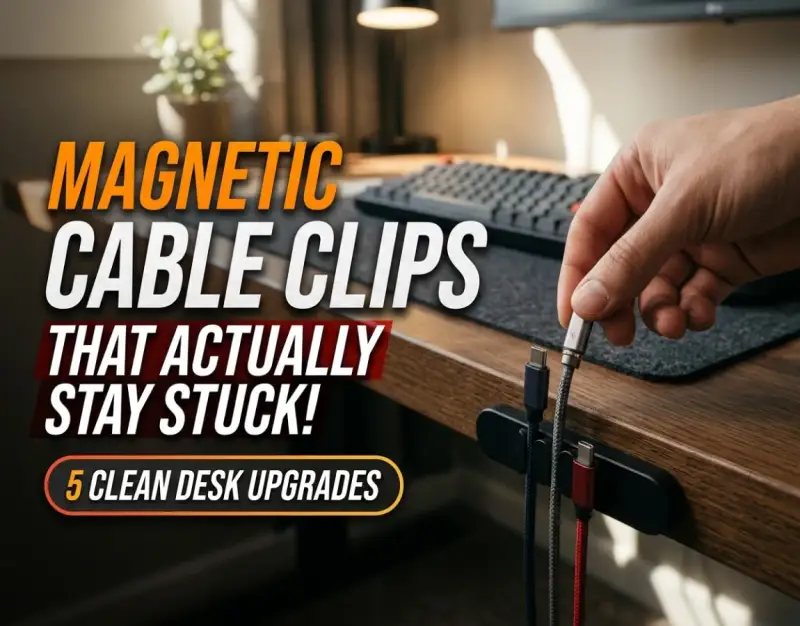
There is a quiet, psychological tax paid by anyone who sits down at a cluttered desk every morning. The moment your eyes register the chaotic nest of rubberized wires spilling over the back edge of your workspace, your brain begins a low-grade, exhausting background computation. You spend precious cognitive energy navigating around dead loops of USB-C cords, fishing for fallen charging heads, and untangling a Gordian knot of power adapters just to plug in a laptop. In the modern knowledge-economy, our physical workspaces are direct extensions of our cognitive architecture. When the physical environment is fractured and disorganized, our focus inevitably follows suit.
For years, the industry standard for combating this digital sprawl involved heavy-handed, archaic interventions: thick plastic zip ties, industrial-strength Velcro strips, and rigid under-desk trays that required a power drill and a weekend afternoon to install. While these brute-force methods hid the mess, they made dynamic adjustments nearly impossible. If you needed to swap out a charging cable or take your laptop on the road, you were forced to engage in a frustrating game of surgical extraction, cutting zip ties and rethreading wires through narrow conduits. The workflow friction was simply too high for most professionals to maintain long-term, leading inevitably back to a state of perpetual disarray.
Enter the era of modern ergonomics and intentional design, where Minimalist Headphone Stands: 5 Sleek Ways to Display Your Over-Ear Audio Gear set a new precedent for desktop aesthetics. Today, the conversation has fundamentally shifted from merely hiding cables to elevating cable management into a seamless, tactile element of a Smart Ambient Backlighting Kits: How We Turned Our Living Room Into a Home Theater style environment. At the absolute forefront of this revolution are magnetic cable clips. These unassuming, elegantly engineered anchors solve the eternal tug-of-war between accessibility and aesthetics. By combining weighted or adhesive bases with magnetic collars, they allow cords to snap securely into place and release instantly on demand. This comprehensive investigative guide explores how high-performance magnetic cable clips can transform your workspace into a masterclass of order, efficiency, and minimalist beauty.
Understanding the Physics and Mechanics of Magnetic Cable Retention
To truly appreciate why magnetic cable clips outperform every traditional wire-management tool on the market, we must first examine the mechanics that govern them. At their core, these systems rely on a two-part symbiotic design: a permanent magnetic base anchored to your desk surface, and a specialized silicone or thermoplastic elastomer (TPE) collar that wraps snugly around the shaft of an individual cord. When brought within proximity, rare-earth magnets—typically neodymium—draw the collar and the base together with a satisfying, tactile snap, holding the cable firmly suspended in mid-air.
However, engineering a clip that "actually stays stuck" requires solving a dual-threat mechanical puzzle. The first challenge is adhesive failure: the base must maintain an unbreakable bond with surfaces ranging from porous wood veneer to sleek tempered glass and powder-coated steel. The second challenge is shear force: when you yank a cable to plug it into your phone, the lateral pulling force can easily dislodge a poorly designed clip from the desktop. Premium magnetic systems combat this by distributing the pulling load across a wider surface area, utilizing 3M VHB (Very High Bond) acrylic foam tape that cures over 72 hours to achieve molecular-level adhesion.
Understanding the interplay between magnet grade (N52 neodymium is the gold standard for holding power), collar durometer (soft enough to grip varying cable diameters without crushing internal copper wiring), and base weighting allows you to curate an intentional setup. When properly specified, these clips eliminate desk clutter while providing an ergonomic glide that feels utterly effortless in daily use.
1. Assessing Your Desktop Ecosystem and Cable Inventory
Auditing Your Daily Drivers vs. Peripheral Wires
Before purchasing or installing a single magnetic clip, you must conduct a rigorous audit of your physical desktop ecosystem. Not all cables deserve a home on the top surface of your desk. Categorize your cords into two distinct operational groups: "daily drivers" (such as your primary laptop charger, phone lightning/USB-C cable, and mechanical keyboard wire) and "peripheral infrastructure" (such as monitor power bricks, Ethernet lines, and printer USBs). Daily drivers require immediate, frictionless access within arm's reach, making them prime candidates for magnetic clips. Peripheral infrastructure, on the other hand, should be routed discreetly along the back edge or underside of the desk.
During this audit, take exact measurements of your cable diameters using a digital caliper if possible. Standard magnetic collars accommodate wire outer diameters (OD) ranging from 2.5mm for slender lightning cables up to 6.5mm for braided, heavy-duty power cords. Forcing a thick braided cable into an undersized collar will warp the silicone and compromise the magnetic seal, while an oversized collar will allow a thin cable to slip through freely, defeating the purpose entirely. Documenting your precise inventory ensures you select a multi-pack configuration that matches your actual hardware needs rather than guessing blindly.
Surface Material Compatibility and Adhesive Preparation
The single greatest point of failure in desk cable management is not the magnet itself, but the adhesive interface between the clip base and the furniture surface. Different materials present unique surface energy challenges. Laminated particle board, sealed hardwood, and tempered glass require drastically different preparation protocols to ensure the 3M VHB tape achieves maximum contact. Begin by thoroughly cleaning the target zone with a 90% isopropyl alcohol solution to strip away microscopic oils, dust, and manufacturing residue left over from furniture assembly.
Once the surface is chemically pristine and completely dry, consider the surface texture. If your desk features a heavily textured wood grain or a rugged powder coat, standard adhesive pads will bridge over the microscopic valleys, resulting in weak contact points. In these scenarios, applying a liquid adhesion promoter (such as 3M 94 primer) to the desktop surface creates a chemical bond that supercharges the holding power of the adhesive pad. Always apply firm, consistent thumb pressure to the base for a full 60 seconds upon installation, and resist the temptation to attach cables or pull magnets for at least 24 to 48 hours to allow the adhesive to fully cure.
2. Selecting and Positioning Your Magnetic Anchor Bases
Strategic Placement for Zero Ergonomic Friction
Placement is where science meets personal workflow choreography. If you place your magnetic cable clips too far back on the desk surface, you will find yourself leaning forward and stretching uncomfortably every time you need to grab a charging cord. Conversely, placing them too far forward turns your workspace into an industrial obstacle course where your wrists constantly brush against the hardware while typing. The sweet spot lies precisely in the "ergonomic threshold"—about 4 to 6 inches back from the front edge of the desk, directly aligned with your dominant hand's natural operating zone.
When positioning multiple bases, maintain a minimum lateral spacing of at least 1.5 inches between them. If placed too close together, the neodymium magnets from adjacent bases will exert magnetic cross-talk, pulling the collars sideways and causing them to snap into unintended alignments or stick to each other rather than their respective bases. Create a linear or gentle arc array that mimics the natural sweep of your hands across the desktop, ensuring that grabbing a cable feels like drawing a sword from a sheath—fluid, natural, and instantaneous.
Multi-Tiered Routing: Combining Desktop Bases with Under-Desk Management
A truly pristine minimalist desk setup relies on depth, not just surface area. Magnetic cable clips should never work in isolation; they represent the frontline tactical units of a broader multi-tiered routing strategy. While your magnetic clips hold the working business ends of your daily charging cables, the slack of those same cables must be managed beneath the desk surface to prevent a unsightly pool of wire coils from accumulating on your lap or dangling visibly.
Pair your desktop magnetic anchors with an under-desk wire basket or J-channel raceway. Drop the excess length of your charging cables through a discreet desk grommet or route them cleanly over the back edge, gathering the slack inside the under-desk tray. This creates a clean separation of duties: the under-desk infrastructure manages bulk storage and power distribution, while your magnetic clips manage dynamic, everyday access. For quick field fixes or adjustments to this under-desk routing, having access to a reliable Pocket Multi-Tools That Don't Suck: 4 Compact EDC Additions for Daily Fixes kit ensures you can tighten mounting screws or snip stray zip-tie tails on the fly.
3. Mastering Cable Collar Installation and Tension Management
Precision Wrapping and Silicone Durometer Matching
Installing magnetic collars onto your cables requires patience and precision. If you slide the collar too close to the connector head, it will interfere with your hand grip when plugging the device into your laptop or phone. If you place it too far down the cord, excess slack will drape awkwardly across your desk surface, ruining the minimalist aesthetic you worked so hard to achieve. As a rule of thumb, position the collar approximately 8 to 10 inches up from the hardware connector—just enough distance to allow full range of motion without creating slack loops.
Pay close attention to the silicone durometer of the collars you select. High-quality clips use flexible, memory-retentive TPE that conforms tightly to the cable jacket without stretching permanently out of shape. When wrapping the collar around braided cables, ensure the textured grip inside the collar engages with the woven nylon mesh rather than sliding freely. For ultra-thin silicone cables, you may need a collar with an integrated interior gripping ridge to prevent the cable from sliding axially through the collar when yanked.
Eliminating Cord Memory and Managing Dynamic Pull Force
Cables possess a stubborn mechanical property known as "cord memory"—the tendency of extruded PVC or nylon-braided wire to retain the coiled shape it had inside its original retail packaging. This memory fights against your magnetic clips, applying constant torsional force that can twist the magnetic collar sideways and eventually break the adhesive bond of the base. Before snapping a freshly unboxed cable into your magnetic clip, you must neutralize its memory.
To eliminate cord memory, gently warm the cable with a handheld hairdryer on a low setting for 30 seconds while pulling it taut between your hands, then let it cool completely in a straight configuration. Once the cable hangs dead-straight under its own weight, snap it into your magnetic anchor base. This eliminates internal twisting forces, ensuring that when you release the cable, the magnetic collar snaps effortlessly back into alignment without torquing the base or causing the adhesive pad to lift.
4. Advanced Customization and Aesthetic Integration
Color Coding, Anodized Finishes, and Material Harmony
In a minimalist desk setup, every accessory must either completely disappear into the background or serve as a deliberate design accent. Cheap plastic cable clips finished in glossy, high-reflectance white or garish primary colors instantly shatter the sophisticated ambiance of a professional workspace. Modern high-end magnetic cable clips are crafted from aerospace-grade aluminum alloys, zinc-alloy die castings, or weighted stone composites, offering matte anodized finishes that complement high-end hardware like MacBooks, mechanical keyboards, and studio monitors.
When selecting your hardware, match the finish of your magnetic clips to existing desk accents—such as space gray aluminum stands, matte black monitor arms, or brushed gunmetal hardware. Furthermore, if you manage multiple identical USB-C cables (for instance, powering a personal laptop, a work laptop, and an iPad), utilize subtly color-coded magnetic collars or laser-etched icon markers. This allows you to instantly identify which cable delivers high-wattage Power Delivery (PD) versus standard data transfer, saving you from trial-and-error plugging during intense work sessions.
Transitioning Between Stationary and Mobile Workflows
The true genius of magnetic cable management shines when your workflow requires mobility. If you are a hybrid worker who routinely packs up a laptop to work from local cafes or corporate offices, traditional cable management solutions turn packing into a dreaded chore. With magnetic clips, the transition from desk warrior to mobile road-warrior is entirely frictionless. Instead of unthreading cables from rigid clips or untangling desk grommets, you simply lift the magnetic collar straight up from its base, leaving the anchored base securely attached to your desk.
Your charging cable remains neatly collared, ready to be tossed directly into your EDC tech pouch without tangling with your headphones or portable battery banks. When you return to your desk at the end of the week, bringing the magnetic collar within half an inch of the anchored base results in an instant, blind-snap docking action. This micro-interaction transforms a mundane administrative task into a deeply satisfying sensory ritual, encouraging you to keep your desk immaculate day after day.
5. Maintenance, Troubleshooting, and Long-Term Durability
Restoring Adhesive Strength and Managing Dust Accumulation
Over months of continuous use, even the finest magnetic cable management systems require basic preventative maintenance. Neodymium magnets are notorious for attracting airborne iron filings, metallic desk dust, and microscopic debris, which can accumulate on the mating surfaces of your bases and collars. If left unchecked, this debris creates a physical barrier that weakens the magnetic pull force and causes an audible crunching sound when docking your cables.
To restore peak performance, clean your magnetic interfaces monthly using a strip of low-tack painter's tape pressed against the magnetic faces to lift away trapped metallic dust. If a magnetic base ever gets knocked loose due to an accidental heavy impact, never attempt to reuse the old adhesive pad. Peel away the remnants of the old 3M VHB tape using a plastic scraper, clean the area with isopropyl alcohol, and apply a fresh precut replacement adhesive pad. This restores 100% of the original factory holding strength, ensuring your investment lasts for years.
Scaling Up: Expanding Your System for Multi-Monitor and Streaming Rigs
As your digital setup evolves—perhaps expanding to include a dual-monitor array, a dedicated streaming microphone, a macro pad, and external SSD enclosures—your cable management strategy must scale accordingly. Resist the urge to clutter your primary desk surface with endless rows of individual magnetic clips. Instead, transition to a modular system that combines dual-slot and triple-slot magnetic base strips.
Modular strips allow you to dock up to three or four parallel cables in a sleek, unified footprint that occupies minimal desktop real estate. Pair these desktop modular strips with dedicated cable-sleeving tubes for vertical drops behind monitor stands. By treating your workspace as an expandable, modular ecosystem, you can add or subtract peripheral devices infinitely without ever compromising the pristine, tangle-free visual baseline of your minimalist desk setup.
Real-World Case Studies & Scenarios
To understand the transformative power of magnetic cable management, let's examine two contrasting real-world case studies from professional digital workspaces.
Scenario A: The Chaotic Creative Agency Studio (Before vs. After)
Marcus, a senior video editor, operated in a state of high-friction chaos. His desk featured three monitors, a drawing tablet, dual external hard drives, and a MacBook Pro charging station. Every evening, unplugging his laptop required a frustrating physical struggle: reaching behind heavy monitor arms, untangling power bricks, and fishing for fallen USB-C cords that had slipped off the desk and vanished into the abyss behind the floorboards. The visual clutter caused chronic distraction, and his workspace looked more like a server room disaster than a professional creative suite.
The Intervention: Marcus performed a complete desk overhaul. He installed an under-desk cable raceway to house his heavy power bricks, routed his permanent display cables through desk grommets, and deployed a set of heavy-duty aluminum magnetic cable clips along the ergonomic threshold of his desktop. He collared his primary laptop charger, tablet tether, and headphone charging line.
The Result: The transformation was immediate and profound. Packing up his laptop for on-site client shoots dropped from a frustrating 5-minute ordeal to a literal 2-second lift-and-go. Upon returning, docking his workstation required zero visual attention—the magnetic collars snapped effortlessly into place. Marcus reported a measurable reduction in end-of-day cognitive fatigue, attributing his renewed focus directly to the visual and operational serenity of his upgraded workspace.
Scenario B: The Corporate Remote Worker (The Adhesive Failure Lesson)
Sarah, a remote financial analyst, attempted a DIY desk upgrade using cheap, unbranded magnetic cable clips purchased from a discount online marketplace. Excited to eliminate her charging cord mess, she peeled the backing off the adhesive pads and slapped them directly onto her textured oak veneer desk without cleaning the surface, immediately attaching heavy braided power cables.
The Failure: Within 48 hours, under the constant lateral shear force of pulling her phone charger, the cheap adhesive pads failed completely, ripping the clips off the wood surface and leaving behind a sticky, unsightly residue. Frustrated, Sarah concluded that "magnetic clips are a gimmick that doesn't actually stay stuck."
The Lesson: Sarah's failure was entirely operational, not conceptual. By investing in premium, industrial-grade clips featuring genuine 3M VHB tape, thoroughly cleaning her desk with isopropyl alcohol, and allowing a 72-hour curing window before applying mechanical load, she re-installed the system correctly. The second attempt held firm against daily heavy pulling, proving that superior hardware combined with proper installation protocols yields flawless, long-lasting performance.
Critical Mistakes to Avoid When Upgrading Your Desk
Even with premium gear, certain common pitfalls can compromise your cable management efforts. Avoid these five critical mistakes to ensure a flawless setup:
- Skipping Surface Preparation: Applying adhesive bases to dusty, oily, or unprimed desks guarantees premature failure. Always clean with 90% isopropyl alcohol and respect the full adhesive curing window.
- Overloading Single-Slot Bases: Forcing two or three thin cables into a single-slot magnetic collar designed for one cord stretches the silicone and causes slippage. Always match collar sizing to your cable outer diameter.
- Placing Anchors Outside the Ergonomic Zone: Installing clips too far forward interferes with your wrists while typing; placing them too far back causes physical strain. Stick to the 4-to-6-inch ergonomic threshold.
- Ignoring Cord Memory: Failing to neutralize the internal twisting memory of newly unboxed cables creates constant torsional force that eventually lifts adhesive bases off the desk. Always straighten and set cables before collaring.
- Isolating Desktop Clips from Under-Desk Infrastructure: Relying solely on desktop magnetic clips while ignoring trailing slack underneath creates a hidden mess. Always combine surface anchors with an under-desk raceway or tray.
Comprehensive Comparison Table: Cable Management Strategies
| Management Strategy | Installation Effort | Aesthetic Appeal | Dynamic Flexibility | Durability & Longevity |
|---|---|---|---|---|
| Magnetic Cable Clips | Low (Adhesive peel & stick) | Exceptional (Minimalist & clean) | Instantaneous (Snap & release) | High (When paired with 3M VHB) |
| Plastic Zip Ties | Medium (Requires cutting & tools) | Poor (Industrial & cluttered) | Zero (Permanent & destructive) | High (Until cut) |
| Velcro Cable Wraps | Low (Wrap & press) | Moderate (Bulky fabric look) | Low (Friction-based closure) | Moderate (Velcro degrades over time) |
| Under-Desk Trays / J-Channels | High (Requires drilling/screws) | High (Hides bulk infrastructure) | Low (Requires reaching underneath) | Permanent / Extremely High |
| Rubber Desktop Drops | Low (Adhesive or weighted) | Moderate (Prone to accumulating dust) | Moderate (Slips on thick cables) | Low-Moderate (Silicone wears out) |
Frequently Asked Questions (FAQ)
Do magnetic cable clips damage or interfere with laptop charging and data cables?
No. The permanent neodymium magnets used in high-quality cable clips produce a localized static magnetic field that is orders of magnitude too weak to interfere with the high-speed electrical data signals flowing through copper USB-C, Thunderbolt, or HDMI lines. Furthermore, digital data protocols are fully shielded against external magnetic interference. Similarly, charging cables—whether delivering 5W or 240W Power Delivery—experience zero disruption, as magnetic fields do not alter conducted electrical current within insulated copper conductors.
Can I remove or reposition magnetic adhesive bases without ruining my desk finish?
Yes, provided you use the proper removal technique. Premium 3M VHB adhesive pads are designed to hold aggressively under shear force but can be cleanly removed by applying gentle, steady mechanical leverage. To remove a base without damaging wood veneer or painted surfaces, use a piece of unwaxed dental floss or fishing line in a sawing motion behind the base pad to slice through the foam tape. Clean any residual adhesive residue using a citrus-based adhesive remover or isopropyl alcohol on a micro-fiber cloth.
Why do my magnetic clips keep falling off the desk despite pressing them down?
The vast majority of adhesive failures stem from skipping the chemical cleaning phase or loading the clips with cables before the adhesive has fully cured. Acrylic foam tape requires time to flow into the microscopic pores of a desk surface. If you hang heavy, memory-stiff cables off a freshly stuck clip immediately, the torsional pull force will overcome the uncured bond. Always clean with isopropyl alcohol, apply firm thumb pressure for 60 seconds, and wait a full 48 to 72 hours before attaching your cables.
Are magnetic cable clips compatible with braided and heavy-gauge cables?
They are fully compatible, provided you select the correct collar size. Standard magnetic clips often come with interchangeable collars or expandable TPE slots specifically rated for braided cables up to 6.5mm in diameter. Because braided nylon outer jackets have a slightly rougher texture than smooth PVC, they actually grip inside silicone collars much better, preventing the cable from sliding axially when you pull on the connector head.
How many magnetic clips do I actually need for a clean minimalist desk setup?
For a standard professional workstation featuring a laptop, phone, and external audio gear, an array of three individual clips or one triple-slot modular base is the optimal sweet point. Overcrowding your desk with excessive clips creates visual clutter and defeats the minimalist philosophy. Stick strictly to your daily drivers—cables you interact with multiple times per day—and route all permanent peripheral infrastructure beneath the desk surface.
Strategic Roadmap and Final Takeaway
Achieving a truly pristine, frictionless workspace is not an overnight event; it is an intentional exercise in environmental design. As we look toward the future of remote and hybrid work over the next two to five years, our desks are evolving from static workstations into dynamic command centers that must seamlessly accommodate shifting hardware, portable devices, and ergonomic requirements. Brute-force cable management strategies of the past are no longer compatible with this agile reality.
By integrating high-performance magnetic cable clips into your desk setup, you bridge the eternal gap between aesthetic minimalism and operational accessibility. The ability to snap a cord into place with a blind touch and release it instantly upon departure transforms your daily workflow from a frustrating physical chore into an effortless ritual of focus. Audit your cables today, invest in quality hardware with industrial-grade adhesives, and reclaim your workspace—one clean snap at a time.
Be the first to share a gentle reflection on this story.