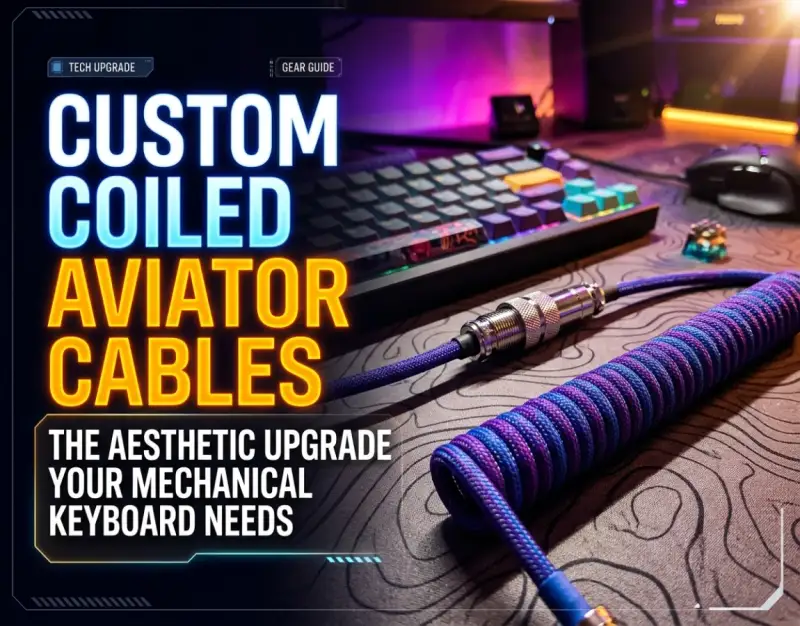
For decades, the standard computer peripheral interface was a utilitarian afterthought—a rigid, beige, or pale-gray rubber wire tucked unceremoniously behind heavy CRT monitors and clunky towers. It delivered data and power without ambition, designed strictly for function rather than form. Fast-forward to the modern era of precision-engineered workspace design, where ergonomics, minimalism, and personalized deskscapes have elevated the computer setup to an art form. At the absolute center of this tactile revolution sits the mechanical keyboard, an object of artisan craftsmanship, bespoke keycap profiles, and meticulously tuned acoustic signatures. Yet, a mechanical keyboard is only as complete as its connection to the host machine.
Enter the world of the coiled aviator cable—a masterclass in engineering utility and visual drama that has swiftly become the holy grail of modern desk ergonomics. These accessories do more than simply bridge the gap between your custom board and your computer; they inject an unmistakable layer of industrial luxury and vibrant self-expression into your daily work environment. As remote work, streaming, and content creation converge, the visual coherence of your camera framing has never been more scrutinized. Whether you are building an ultra-clean, monochromatic workspace or searching for the final punctuation mark to complement your keycap set, a high-performance mechanical keyboard cable changes the entire aura of your creative space.
However, navigating the landscape of custom cables requires an appreciation of wire gauges, shielding materials, voltage drops, and structural coil memory. Not all braided USB C cable options are created equal, and choosing an inferior product can lead to unstable power delivery, data latency, or a coil that sags and unravels after a single week of use. This exhaustive guide explores the mechanics, design choices, real-world deployment strategies, and expert maintenance required to select and style the ultimate custom desk aesthetics upgrade for your battle station or professional studio.
Foundational Principles: Anatomy of a Custom Coiled Cable
To truly appreciate why enthusiasts invest heavily in custom wiring, one must deconstruct the engineering principles behind a professional-grade coiled cable. At its foundation, a keyboard cable is tasked with two critical functions: transmitting data packets rapidly via the USB protocol and delivering steady, reliable power to high-draw peripherals featuring per-key RGB illumination, OLED screens, or hot-swappable wireless transmitters.
The journey of the wire begins with the inner core conductors. High-end cables typically utilize a 28 AWG (American Wire Gauge) data pair paired with a heavier 24 AWG or 26 AWG power pair to minimize voltage drop over distance. This conductor bundle is shielded by an aluminum Mylar foil and wrapped in a tinned copper braid to reject electromagnetic interference (EMI) generated by nearby monitors, speakers, and power bricks. Without adequate shielding, high-performance keyboards operating with heavy macro polling rates can experience input jitter or connection drops.
Surrounding this inner shielded core is a layer of flexible PVC or thermoplastic elastomer (TPE) jacketing, which provides structural integrity before the decorative outer sleeving is applied. The outer sleeve—often constructed from polyethylene terephthalate (PET) techflex or Paracord—defines the tactile and visual texture of the cable. Paracord offers a matte, fabric-like finish with a wide spectrum of pastel and vibrant colors, whereas Techflex provides a semi-transparent, glossy sheen that allows underlying patterns or neon inner sleeves to pop with striking luminosity.
The Physics and Craft of the Tight Coil
The iconic coil is not merely a styling choice born of retro telephone handset nostalgia; it is a masterclass in controlled material memory and thermal physics. Creating a tight, uniform coil requires wrapping the straight cable tightly around a cylindrical mandrel—usually a metal rod or wooden dowel—and securing it at both ends with extreme tension. The assembly is then subjected to precise heat treatment, typically using a specialized heat gun or industrial oven at carefully calibrated temperatures.
This thermal baking process alters the molecular structure of the inner polymers, training the cable to permanently "remember" its spiral geometry. Once cooled and unwrapped, a properly baked coil possesses a spring-like resilience. It can stretch to accommodate temporary repositioning of your keyboard without losing its shape, snapping back into a tight, uniform cylinder the moment tension is released. Poorly constructed coils, by contrast, rely merely on temporary twisting rather than thermal memory, leading to sagging, uneven gaps, and an unkempt desk appearance.
Furthermore, the physical weight of a dense coil serves an ergonomic purpose. By anchoring the cable closer to the back edge of the desk pad, the coil absorbs micro-vibrations and prevents the heavy braided wire from pulling awkwardly on the USB-C port of your precious mechanical keyboard. This reduces long-term strain on the internal solder joints and port housing, significantly extending the lifespan of your hardware.
The Aviator Connector: Form Meets Modular Function
Perhaps the most visually striking component of these assemblies is the metal quick-disconnect mechanism, commonly referred to as the aviator connector. Originating from military and aerospace communication systems—specifically the classic Push-Pull or threaded MIL-SPEC GX16 and GX12 series connectors—these heavy-duty metal couplings introduce an unmistakable industrial aesthetic to your desktop.
Beyond their rugged, retro-futuristic looks, aviator connectors offer genuine modular utility. If you own multiple keyboards with different colorways or connection requirements (such as switching between a USB-C board, an older Micro-USB pad, or even a mini-USB vintage macro device), you can keep a single host-side cable plugged into your computer or docking station and simply swap out the keyboard-side tail in seconds.
When selecting an aviator connector, pay close attention to the pin configuration. Standard USB 2.0 protocols require four active lines: VBUS (Power), Ground, D+ (Data Positive), and D- (Data Negative). A 4-pin GX16 connector is the industry standard for handling these requirements securely. Always ensure that the solder cups inside the connector shell are properly insulated with heat-shrink tubing to prevent short circuits, which can catastrophic for both your keyboard controller and your computer's USB host controller.
Power Delivery, Voltage Drop, and Cable Length Physics
While aesthetics drive the initial purchase decision, electrical performance dictates whether your keyboard will function reliably under heavy loads. USB specifications mandate that power delivered across a bus should remain within acceptable tolerances (typically 5V ± 5%). However, as cable length increases, resistance within the copper conductors causes voltage drop—a phenomenon governed by Ohm's Law.
Adding a heavy coil introduces significant extra wire length into a seemingly short cable. For example, a modest 6-inch coil might contain upwards of three to four feet of straightened wire compressed into its spiral structure. When combined with a 5-foot straight host cable, your total electrical run can easily exceed 8 to 10 feet. If your keyboard features power-hungry upgrades like per-key RGB set to maximum brightness, secondary OLED status panels, and wireless 2.4GHz dongles plugged into a USB pass-through port, an under-gauged cable will experience voltage starvation.
To combat this, elite manufacturers employ thicker power conductors (24 AWG) specifically for custom runs exceeding six feet total length. Additionally, pairing your desk setup with accessories that optimize power efficiency—such as managing peripheral power strips with Smart Plug Energy Monitors: How to Track and Slash Your Power Bill—ensures your entire workstation runs on stable, optimized current without unexpected brownouts or device disconnects.
Matching Your Coiled Cable to Your Desk Architecture
Integrating a custom coiled cable into your workspace requires a holistic design philosophy. The cable should not exist in a vacuum; it must anchor the visual weight of your keyboard while harmonizing with your desk mat, monitor light bars, wrist rests, and overall room lighting. Achieving a cohesive look involves careful consideration of color theory, texture contrast, and hardware finishes.
Monochromatic Minimalism vs. High-Contrast Pop
For minimalists utilizing walnut wood desks, matte black accessories, and subtle lighting, a black or dark charcoal cable wrapped in dark gray Techflex offers understated elegance. The aviator connector can be finished in gunmetal or black anodized aluminum to blend seamlessly into the background, letting the natural grain of the wood and the clean typography of your keycaps take center stage.
Conversely, if your build centers around pastel keycap sets—such as botanical green, vaporwave pink, or cyberpunk neon—your cable should act as an accent piece. Pair a soft pastel Paracord inner sleeve with a clear Techflex outer layer to create a glowing halo effect under your desk lighting. To illuminate these intricate desk details during late-night productivity sessions, many enthusiasts complement their keyboard setup with Rechargeable Cabinet Touch Lights: 5 Wireless Ways to Brighten Dark Corners to cast a clean, cable-free glow across their work surface.
Cable Routing and Desk Mat Integration
The physical placement of the coil on your desk mat can dramatically alter your ergonomic comfort. The transition point where the coil ends and the straight section runs toward your computer should be routed cleanly across your desk pad. Many users position the coil directly above the top edge of their keyboard, allowing the straight tail to sweep gracefully to the left or right toward a hidden USB hub or monitor pass-through.
Avoid letting loose loops of wire drape over the front edge of your desk, where they can snag on chair arms or your clothing. Utilizing under-desk cable management trays or weighted desk clips helps maintain absolute tension and alignment, ensuring your custom cable looks like a permanent, architectural fixture of your workstation rather than a tangled afterthought.
Real-World Case Studies: Success Stories vs. Failure Scenarios
To understand the practical impact of investing in a high-tier custom cable versus settling for cheap alternatives, examining real-world deployment scenarios provides invaluable perspective. Let us look at two contrasting case studies from professional desk setups.
Case Study A: The Corporate Executive's Ergonomic Sanctuary
Marcus, a senior financial analyst and avid mechanical keyboard collector, upgraded his home office workspace with a custom 6-foot braided cable featuring a rose gold aviator connector, matching his aluminum custom keyboard case and brushed desk accessories. By pairing the heavy-gauge 24 AWG wire with a stable USB 3.0 powered hub, Marcus eliminated random keyboard dropouts that plagued his previous generic rubber cable. Furthermore, the aesthetic boost transformed his daily video conferencing background, drawing immediate compliments from colleagues and establishing a polished, professional atmosphere.
Case Study B: The Budget Trap and Voltage Sag
Conversely, Sarah purchased an ultra-cheap, unbranded "coiled aesthetic cable" from a discount marketplace for under fifteen dollars. Within two weeks, the loose, non-heat-treated coil began to unspool into a sloppy, wavy mess. More critically, when Sarah enabled maximum RGB brightness on her macro-pad, her computer began throwing USB overcurrent warnings, and the keyboard would randomly disconnect during intense typing sessions. An autopsy of the cable revealed ultra-thin 32 AWG unshielded conductors inside that couldn't handle the power draw. Sarah ultimately replaced it with a professionally manufactured cable, learning that structural integrity and electrical engineering cannot be compromised for a quick bargain.
These scenarios highlight a golden rule of workspace upgrades: peripherals that interface directly with your primary input devices demand robust build quality. When curating a minimalist workspace that balances productivity tools with everyday carry gear—much like the thoughtful curation found in guides detailing 10 Minimalist EDC Gadgets That Make Incredible Stocking Stuffers—every single component must earn its place through verified reliability and timeless design.
Critical Mistakes to Avoid When Buying and Using Custom Cables
Navigating the custom cable market can be treacherous for beginners. Avoiding these five critical pitfalls will save you time, money, and potential hardware damage.
- Ignoring Power Requirements for High-Draw Boards: Buying a cable designed purely for data transmission without checking wire gauge can starve power-hungry keyboards equipped with OLED screens and heavy RGB arrays. Always verify that the manufacturer specifies power wire gauges (24 AWG preferred for long runs).
- Falling for "Fake" Coils: Many budget manufacturers twist cables without thermal baking. These coils lack memory and will permanently stretch out and sag within days. Insist on heat-treated, professionally thermal-baked coils.
- Force-Threading Metal Connectors: Aviator connectors feature fine metal threads. Cross-threading them by rushing the alignment can permanently strip the aluminum or brass collars. Always align the internal guide pin gently before twisting the locking ring.
- Exceeding Maximum Safe Cable Lengths: Pushing total USB cable runs past 15 feet without active signal repeaters or hubs can cause data packet loss, input lag, and unrecognized device errors. Keep your total run under 10 feet for optimal passive performance.
- Neglecting Port Strain Relief: Allowing a heavy aviator connector and dense coil to pull downward directly on a delicate USB-C daughterboard connector will eventually weaken solder joints. Always anchor the straight tail securely to the desk surface.
Comprehensive Comparison Table
Use this reference matrix to evaluate the differences between standard stock cables, budget aesthetic alternatives, and premium custom coiled aviator cables across critical performance metrics.
| Feature / Metric | Stock Rubber Cable | Budget "Aesthetic" Cable | Premium Custom Coiled Cable |
|---|---|---|---|
| Conductor Wire Gauge | Standard 28 AWG (Data & Power) | Thin 28/30 AWG (High Resistance) | Thick 24/26 AWG Power + 28 AWG Data |
| Shielding Quality | Minimal foil shielding | None or sparse braiding | Dual-shielded (Aluminum Mylar + Tinned Copper Braid) |
| Coil Memory & Longevity | N/A (Straight wire) | Unspools and sags within weeks | Permanently heat-baked with resilient spring memory |
| Connector Type | Molded plastic USB-C / Micro-USB | Basic metal housing without secure locking | Military-grade GX16 / Push-Pull quick-disconnect |
| Desk Aesthetic Impact | Utilitarian, cluttered, messy | Inconsistent coil tension, cheap sheen | Luxurious, cohesive, architectural desk centerpiece |
Frequently Asked Questions (FAQ)
Do custom coiled aviator cables cause input lag or latency in gaming?
No. Standard USB 2.0 data protocols transmit signals at the speed of light through copper conductors regardless of whether the physical wire is straight or coiled. As long as the cable is constructed with proper impedance matching and high-quality data-pair wiring within reasonable length limits (under 10-12 feet total), you will experience zero measurable input lag or latency compared to a stock cable. Competitive gamers and esports professionals use custom coiled cables daily without performance penalties.
Can I use my custom keyboard cable to fast-charge my smartphone?
While a custom cable can transfer enough power to charge a phone slowly, it is generally not recommended for high-wattage fast charging (such as USB Power Delivery protocols exceeding 10W-15W). Keyboard cables are engineered specifically for 5V low-current peripheral data and lighting power delivery, not high-voltage mobile device charging. Doing so can generate excessive heat within the tightly packed coil and potentially damage the internal conductors or your phone's charging IC.
What is the purpose of the detachable metal aviator connector?
The aviator connector serves two primary purposes: aesthetic customization and modular convenience. Visually, it provides a rugged, industrial retro-futuristic accent that elevates desk styling. Operationally, it allows you to keep the host-side cable (running to your computer or dock) permanently routed through your desk grommets or cable trays while making it effortless to unplug and swap keyboard-side tails if you rotate between multiple keyboards in your collection.
Why is my keyboard cable coil losing its tightness?
If your coil is stretching out or losing its spring tension, it was likely manufactured cheaply without proper thermal baking (annealing) to set the polymer memory of the inner wire. High-quality coils maintain their structural integrity indefinitely because the manufacturing process heats the wire past its glass transition temperature while wrapped tightly around a mandrel. If a cheap coil stretches, it cannot be easily repaired and typically requires replacement with a professionally heat-treated alternative.
How do I choose the correct color combination for my desk setup?
Start by examining the dominant color palette of your keycap set and desk mat. You can choose a monochromatic approach by matching your cable directly to your desk case (e.g., all black or all white), or create high contrast by selecting an accent color that mirrors a prominent modifier keycap color. Utilizing clear Techflex over a vibrant Paracord inner sleeve adds a luminous reflective quality that ties together contrasting desk accents without clashing with your primary monitor or peripheral lighting.
Strategic Roadmap & Final Takeaway
The evolution of the modern workspace is driven by an uncompromising pursuit of efficiency, tactile pleasure, and visual harmony. Upgrading from a generic plastic wire to a meticulously engineered custom coiled aviator cable is far more than a superficial styling choice—it is a tactile and electrical investment in the nerve center of your daily productivity and creative output.
As workspace design trends continue to evolve over the next two to five years, expect to see even greater integration of modular quick-disconnect standards, advanced magnetic connections, and customizable LED-infused fiber optics. By prioritizing robust internal wire gauges, thermal coil memory, and cohesive desk architecture today, you ensure that your mechanical keyboard setup remains both a marvel of modern engineering and a stunning visual anchor for years to come. Inspect your setup, evaluate your power and aesthetic needs, and make the upgrade that transforms your desk from a simple workstation into an inspiring sanctuary of craftsmanship.
Be the first to share a gentle reflection on this story.